The Accountant’s Lab: Transforming a Ryzen 5 5600 into an AI Powerhouse

I was inspired to build an AI server for my own personal use and to explore how GPT and AI can be used in Accounting in the safety of my home lab.  In today’s post I’ll discuss the build and share some photos.

The build was made with previous generation hardware. This was done primarily for cost reasons but I was still able to assemble a decent system to experiment with. I purchased used or refurbished components wherever possible. The build runs on a Ryzen 5 5600 processor with 32GB of DDR4-3600 RAM and a MSI Ventus 2 RTX 3060 12 GB GPU. Beyond providing enough power to run Linux we can also host various AI packages.

The key component in the build is the GPU as they have the right kind of processor for doing AI work. At 12 Gigabytes this provides a lot of room to host some pretty powerful models.

The operating system is Ubuntu Linux Server 24.04, this has a minimal footprint on the hardware which is important to keep as many resources available for the AI.

Now that the hardware and Operating System are out of the way, let’s talk about the AI Stack, or the software that will host GPT models. I’ll be using three key programs: Ollama, OpenWebUI and SillyTavern.

Ollama is not a Large Language Model like ChatGPT rather it’s the engine that hosts the various models Im going to be testing. A model is a specific brand of LLM or GPT.

To interact with the engine we’ll use two interface programs. OpenWebUI  & SillyTavern. OpenWebUI is an interface that’s accessible from computers on my network. It sends instructions to the model and shows me the responses. In effect it is the interface you work with. It looks visually similar to the AIs you work with on your phone or in your web browser.

Open Web’s User Interface

SillyTavern is another web interface but it is more tuned for character and chat bots. We’ll show off that at a future time

I’ve created a diagram showing how the AI Sack works together and with the users.

the AI Stack

So let’s talk about models

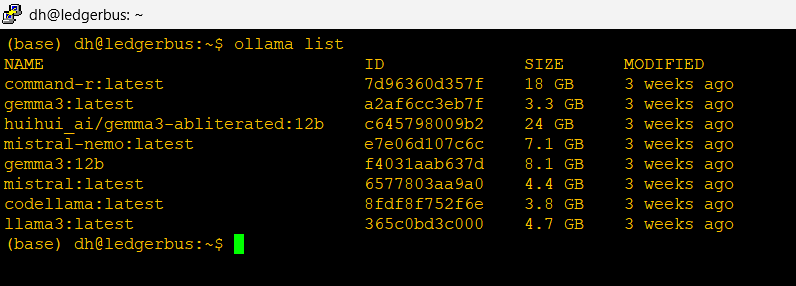
The models currently on my server

I’ve installed several but let’s focus on two key ones here: Mistral-Nemo and Gemma3. These models are tuned to work on smaller infrastructures, although not as sophisticated as the frontier models you’ll use on the web, I think we’ll have some pretty impressive results.

Gemma 3 is made by Google it’s derived from their Gemini model which is available online. In its own words:

“Here’s a breakdown about me, Gemma, perfect for explaining why you chose to use me for your AI server build:

**Who made me?**

I was created by the Gemma team at Google DeepMind. I’m a family of open-weights models, meaning my underlying architecture and weights are publicly available. This is a *big* deal, allowing for greater transparency and community contribution.

**What makes me special?**

Here’s what makes me stand out and why you might have chosen me for your server:

*   **Open Weights:** As mentioned, this is a key differentiator. You can examine, fine-tune, and adapt me for your specific needs. This fosters innovation and control.

*   **State-of-the-Art Performance:** I’m built using the same research and technology that powers Google’s Gemini models, delivering impressive performance on a variety of language tasks.

*   **Designed for Responsible AI:** Google DeepMind has prioritized safety and responsible AI principles in my development. I’m designed to be helpful and harmless, with built-in safeguards.

*   **Efficiency:** I’m designed to be relatively efficient, which is fantastic for running on a server environment – it helps with resource management and cost-effectiveness. You’ll be able to get a lot done without needing massive hardware.

*   **Variety of Sizes:** I come in different sizes (2B and 7B parameters) so you can choose the best fit for your server’s capabilities and performance requirements.”

Mistral-Nemo is a version of Mistral AI’s model optimized to run on Nvidia GPUs.In its own words:

”I was created through a collaboration between Mistral AI and NVIDIA. My key features

Instruction following: I’m designed to follow instructions in my responses better than other models, making our interactions more guided and predictable.

Extensive training data: I was trained on a large dataset of text from the internet, up until 2021, which allows me to provide informative answers across a wide range of topics.

Safety and transparency: My responses are filtered through several safety checks to minimize harmful or biased outputs. Additionally, my team is open about my limitations and provides explanations for my behaviors when possible.”

Administrative Access –

IBM 5150
IBM 5150 connected via Serial

To administer this server I use two methods.

In Band (which means accessed the same way users do): I use SSH over my home network, my laptop and phone each have special software keys and they are the only devices allowed to access the server this way.

Out of Band (which is a direct connection to the server physically): I have my trusty IBM 5150 connected via a serial null modem. You’ll see this terminal in the photo above

So what am I going to do with this? Well I have a lot of ideas and I’m hoping to share them with all of you!

Do you want to learn how to automate your financial workpapers? Do you want to build MicroApps like this one to bloster your own automation toolkit? Do you want to get started with VBA?

My book, Beginning Microsoft Excel VBA Programming for Accountants has many examples like this to teach you to use Excel to maximize your productivity! It’s available on Amazon,Apple iBooks and other eBook retailers!
A Simple Python Machine Learning Script to help Accountants with Account Miscoding

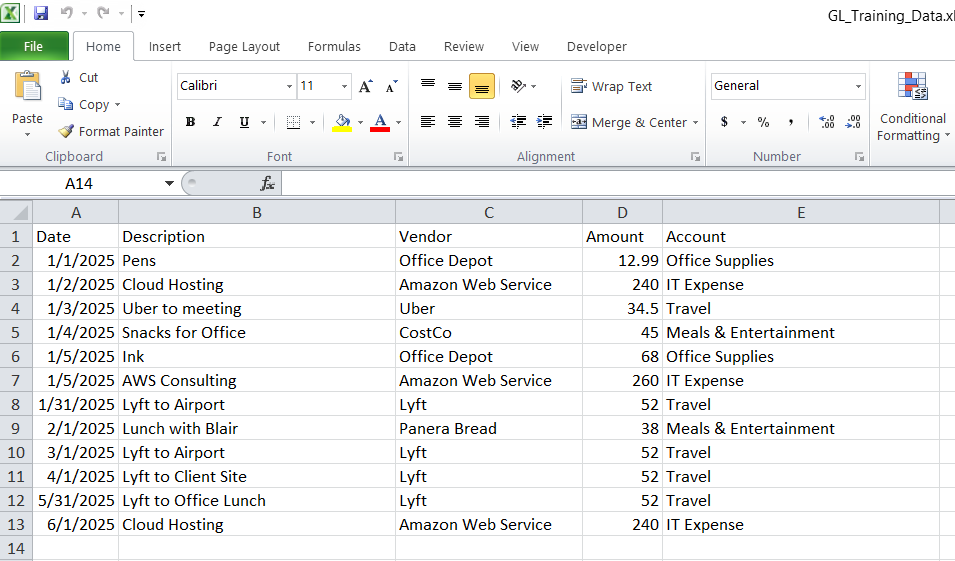
With all the push for AI in the workplace I was curious if I could build a small program using machine learning to perform some useful function for accountants and financial reviewers – as account miscoding came to mind I wrote a program that would predict the account coding of a payable, this could aid a reviewer in determining if the months payable are coded correctly. I made a mock general ledger in Excel and trained a small machine learning model to predict which account each transaction should belong to. If the model’s prediction doesn’t match the coded account, that’s a potential miscoding.

A screenshot from Excel showing a mock general ledger for training data

This model was built in Python 3.9 using Pandas, scikit learn and a couple other modules to support transforming the Excel file into a model the program can work with. 

What is Machine Learning

Machine learning is a subset of artificial intelligence that enables computers to learn and improve from experience without being explicitly programmed, by identifying patterns in data through algorithms trained on examples like labeled images or past transactions. 

It works by feeding data into models, allowing predictions on new data. You see this everyday in recommendations for movies on streaming services, filtering spam emails, or detecting fraud in banking. 

Machine learning is basically pattern recognition.

If your GL says:

  • “Office Depot – pens” → Office Supplies
  • “Printer ink” → Office Supplies
  • “AWS cloud hosting” → IT Expense
  • “Uber to client site” → Travel
  • “Lunch with client” → Meals

…then the model learns those patterns.

Give it a new transaction like:

“AWS EC2 monthly bill – Amazon Web Services – $260”

and it will say:

“This looks like IT Expense.”

If the GL has it coded as something else, that’s a red flag.

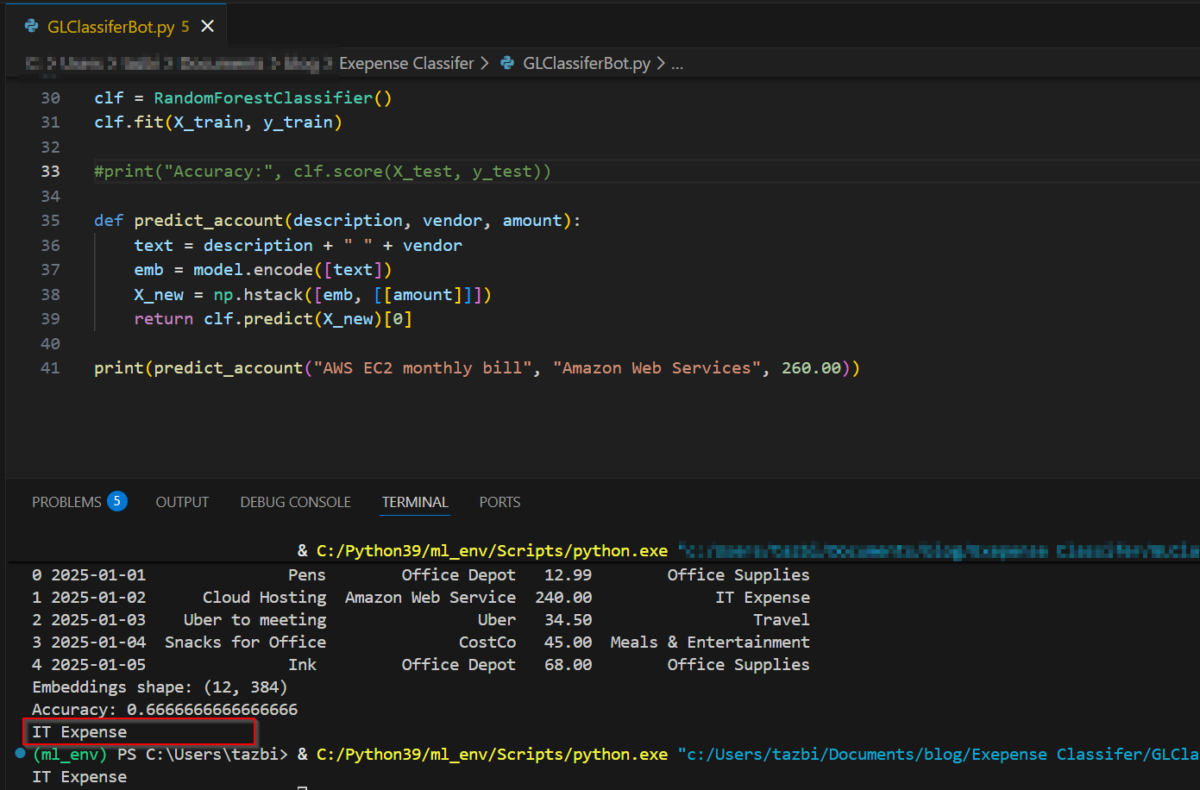
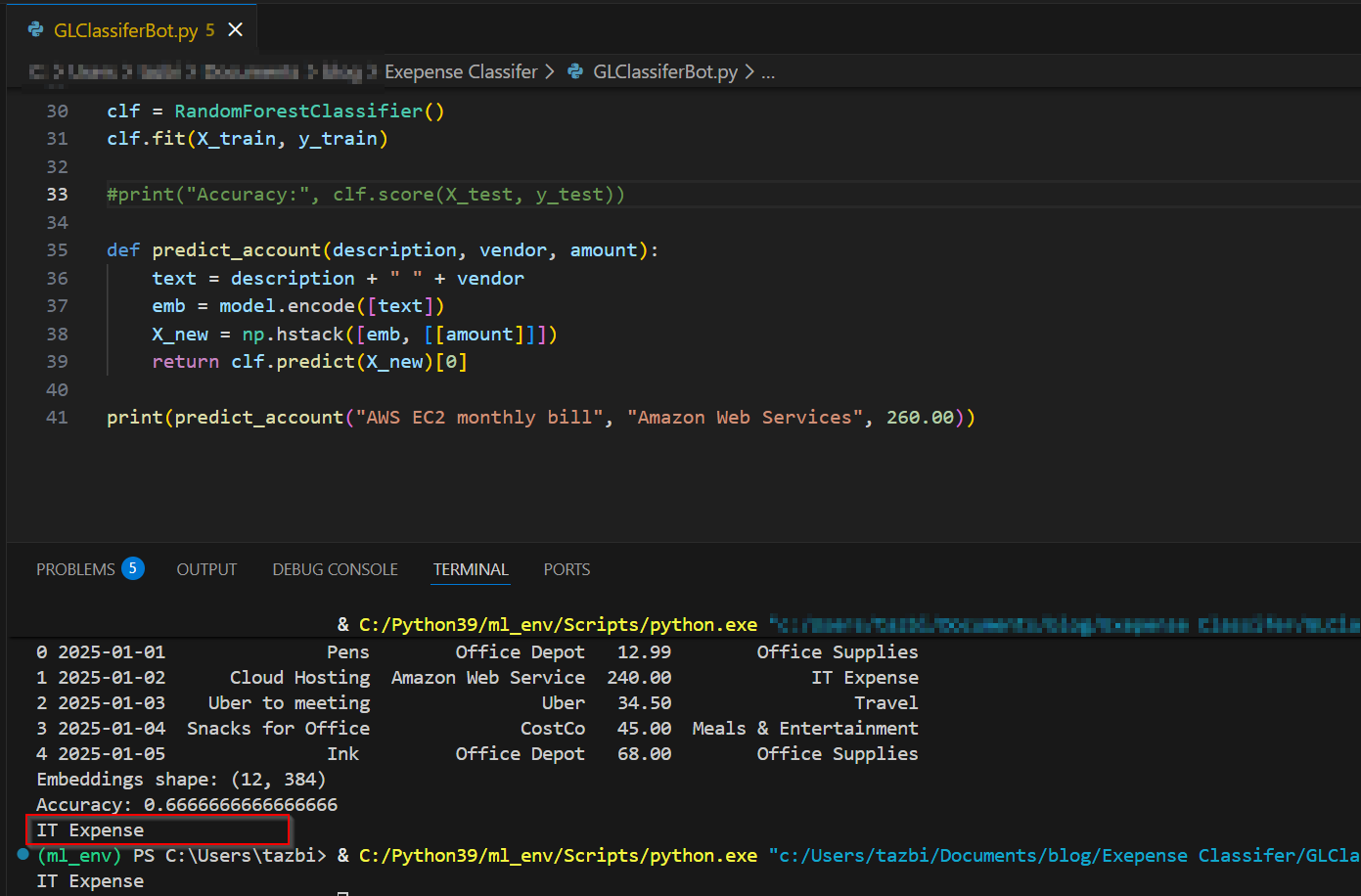
Here’s the Python code:

#! python3
#GL Classifer Bot

import pandas as pd
from sentence_transformers import SentenceTransformer
import numpy as np
from sklearn.ensemble import RandomForestClassifier
from sklearn.model_selection import train_test_split

df = pd.read_excel(r"C:\GL_Training_Data.xlsx")

# Load a lightweight embedding model
model = SentenceTransformer("all-MiniLM-L6-v2")

# Combine text fields into one string
df["text"] = df["Description"].astype(str) + " " + df["Vendor"].astype(str)

# Convert text to embeddings
embeddings = model.encode(df["text"].tolist())
X = np.hstack([embeddings, df[["Amount"]].values])
y = df["Account"]

X_train, X_test, y_train, y_test = train_test_split(
    X, y, test_size=0.25, random_state=42
)

clf = RandomForestClassifier()
clf.fit(X_train, y_train)

def predict_account(description, vendor, amount):
    text = description + " " + vendor
    emb = model.encode([text])
    X_new = np.hstack([emb, [[amount]]])
    return clf.predict(X_new)[0]

print(predict_account("AWS EC2 monthly bill", "Amazon Web Services", 260.00))

the last line feeds in a transaction and the output is it’s expected coding.

A simple walkthrough

Here’s the workflow of how the application works:

1. I loaded my GL from Excel.

Just a simple table with:

  • Date
  • Description
  • Vendor
  • Amount
  • Account

2. I converted the text into “meaning vectors.”

This sounds fancy, but it’s basically a tool that turns text like:

“Uber to client site”

into a list of numbers that represent its meaning.

3. I trained a small model to learn the patterns.

It looks at:

  • the meaning of the description
  • the vendor
  • the amount
  • the account it was coded to

…and learns how they relate.

4. I asked it to predict the account for new transactions.

If the prediction doesn’t match the coded account, I flag it.

That’s it. No deep learning, no giant datasets, no complicated math.

The output with a box drawn around the predicted account

What surprised me

When I only had 8 rows of data, the model predicted everything as “Office Supplies.”
Once I added a few more rows — it suddenly started predicting correctly.

That’s the magic of small ML models:  they don’t need much to start learning.

Why this matters for accountants

This tiny example shows how machine learning can help with:

  • miscoded expense detection
  • reclass suggestions
  • anomaly spotting
  • cleaning up messy GLs
  • speeding up month‑end review

And you can build the whole thing in under an hour.

The takeaway

Machine learning doesn’t have to be intimidating.
You can start with:

  • a tiny GL
  • a few lines of Python
  • and a simple idea:
    “Does this transaction look like the account it was coded to?”

That’s enough to demonstrate the concept — and enough to spark ideas for real‑world automation. This could easily be expanded to use a more complicated general ledger and to automatically search a general ledger under review for correct coding.

Do you want to learn how to automate your financial workpapers? Do you want to get started with VBA?

My book, Beginning Microsoft Excel VBA Programming for Accountants has many examples like this to teach you to use Excel to maximize your productivity! It’s available on Amazon, Apple iBooks and other eBook retailers!
IBM Watson enters ‘Big Four’ accounting firm duel for A.I. dominance – New York Business Journal

In the near future auditors will be aided by power artificial intelligence systems. Near future, is a little inaccurate, in fact it’s already happening. As big data becomes ever more a part of our work lives, computers are needed to make sense of this information and help us preform audit engagements.

The major players are starting to emerge. And big blue is throwing the power of Watson into the mix. KPMG is using their human auditors to teach Watson how to do it’s job. Currently, the software can aid auditors by analyzing contracts, legal documents by looking for keywords and other patterns.

Watson aside – this is becoming the norm in the industry.

A quarter of the 180 CPAs surveyed listed big-data analysis as one of the top industry challenges in the future and 20 percent listed increased complexity and scrutiny in engagements.

Big data will only continue to become more prevalent and we must build the tools needed to audit these systems. Artificial intelligence is poised to be the go to solution when working these engagements. Learning how to use this in our day to day business is a must.

Source: IBM Watson enters ‘Big Four’ accounting firm duel for A.I. dominance – New York Business Journal